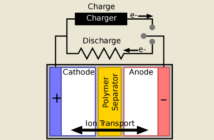
The short answer is yes, it is a good idea to remove your laptop lithium-ion battery when operating on the grid. Before we advise you how to go about this, we first need to share a basic technical fact. Lithium-ion batteries shuttle ions between their cathodes and their anodes even when on mains power.
How Your Laptop Lithium-Ion Battery Is Designed to Age

Lithium ion batteries are not 100% mechanically efficient. Thus, not all the ions layered into their electrodes manage to escape again.
Over time, their capacity to power their host deteriorates. It makes sense to remove your lap top lithium-ion battery when not using it as a primary source of power.
What Happens When You Remove Your Laptop Lithium-Ion Battery
We will assume you turn your laptop off before you do. Connect it to a reliable AC power source before restarting. Business should be as usual. In fact, it will probably be better. Your laptop battery will not suffer exposure to heat. The ions will have a chance to rest. Moreover, there is not the least chance of it overcharging.
How to Go About Preparing a Lithium-Ion Battery for its Holiday

Recharge your laptop to 40% – 50% of capacity before you remove your lap top lithium-ion battery. Always shut it down completely for safety reasons.
Allow it to cool to room temperature. Then pop into a transparent airtight zip lock bag. Store it on the top shelf of the fridge at 4° to 8° temperature.
Recharge it to 40% – 50% of capacity every two weeks. Allow it to return to room temperature in a shady place before you start to recharge.
Tips Before You Remove Your Laptop Lithium-Ion Battery for Storage
We cannot reverse the damage caused to a lithium-ion battery simply by storing in in the fridge. We need to ‘treat it gentle’ all the time as the king of rock Elvis advised. Read our tips on prolonging a lithium-ion battery’s happy life in parallel with this post.
Related