

The Ademco Vista 15P is an alarm system that is manufactured by ADT. It uses a backup battery (which looks like this) that allows it to function even during power outages. This battery requires replacement every 3-5 years.
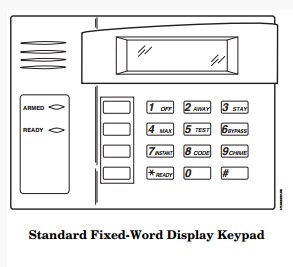
The backup battery uses the house electricity to recharge itself. In case the keypad displays “BAT” without a zone number, that means the battery is drained of power. It is accompanied by a beeping sound that you can turn off when you press [1 OFF]. If you have charged the battery for the last 24-48 hours and the same warning is shown, that means you need to replace the battery.
To replace the Ademco Vista 15P battery, you need to go through these steps.
- Purchase the new battery for the Ademco Vista 15P.
- Place the alarm system on test mode.
- Look for the control panel in a closet, the attic or garage. You will find the old backup battery there.
- Disconnect the old battery starting with the removal of the black wire from the black negative terminal and then the red wire from the red positive terminal. Use pliers with insulated handles for protection. If the wire will not come off, wiggle it to loosen. BE CAREFUL as you remove the battery to avoid a short.
- Remove the terminal protectors (plastic) of the new battery. Connect the red wire first to the positive red terminal. Then, connect the black wire to the negative black terminal.
- Close the control panel box.
- Check if the “BAT” is still displayed. Let the battery recharge for 24-48 hours. If the same warning is there after 2 days, the system might be damaged. Call the alarm provider to have it checked.
- Recycle the old battery.
Related Articles:
How To Change The Battery In Ademco Vista 15CN
How To Change The Battery In Ademco Vista 15
How To Change The Battery In Ademco Vista 10

2 Comments
How can I tell which model number I have? I am not the original owner and I do not have a manual. By looking in the closet at the panel, I know I have a 15 or a 20.
Look at the alarm box, could be in your closet or in your basement. Open the cabinet and look at the board inside, there will an identifying number. Are you looking to program it or to change the battery in it?